034 Eligibility - Overview
Overview of Searches
Folder 034 Eligibility is a collection of searches all designed to support the identification and invitation of patients eligible for particular programmes. It was originally part of Folder 020 (020C), but as the collection expanded they were assigned their own folder for ease of access.
There are currently 6 folders within 034 Eligibility:
- 034A Eligible for Pneumococcal vaccination
- 034B Eligible for Shingles vaccination
- 034C Eligible for NHS Health Check
- 034D Eligible RSV vaccination
- 034E Eligible for Pertussis in pregnancy
- 034U Vaccination Utility Tools
034U Vaccination Utility Tools
This final folder contains searches and reports for copying to help split out patients into groups prior to inviting patients and to support formatting invite lists for different communication providers.
There are two folders to support different approaches:
- Communication - EMAIL and SMS campaign - this folder is designed for practices who wish to send email invitations where possible and then send SMS invitations only to those patients without an appropriate email address (and consent code). This supports practices who are looking to reduce SMS costs and have access to a batch email messaging tool.
- Communication - SMS campaign - this folder is designed for practices who wish to prioritise SMS invitations and are not using batch email messaging.
Each folder includes a number of reports to support various 3rd party communication tools such as AccuRx or iPlato. They also separate out patients living in a care home and housebound patients as these cohorts are usually vaccinated on pre-arranged visits or require review prior to invitation.
Searches for patients with mobile number or email will also check for a consent code showing that the patient has consented to be contacted via that method. Patients who have declined consent will not be included and may revert to the 'no mobile number' search instead.
How to use the Placeholder
1. Identify whether the practice is running an SMS campaign or SMS and EMAIL campaign and select the correct folder.
2. Copy the Communication Placeholder search at the top of the appropriate folder
3. Paste in a convenient location, taking care to tick "Include descendants". It is usually best to copy it to the recall folder you are using. 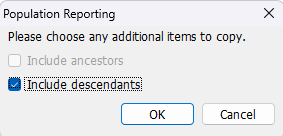
4. IMPORTANT - If copying to 034A-E, the copied placeholder search will be automatically removed when the folder is next updated.
5. Right click on the copied Communication Placeholder search and select Properties.
6. At the bottom click "Results from", then use the Spyglass to choose a parent search of patients to invite (eg: INVITE | PA-344 Patients who can be sent an invitation for shingles vaccine now
7. Run the copied Communication Placeholder search, taking care to click "Advanced options", and tick "Run child searches".