RADF Reasonable Adjustments Digital Flag alert (HP319)
Purpose:
This protocol will:
- The Reasonable Adjustment Digital Flag (RADF) alert is designed to ensure that all your healthcare team are aware of and can act upon the specific needs of patients with disabilities, as defined under the Equality Act 2010.
- This alert appears when a patient record is accessed, signalling either existing consent/dissent for uploading an RADF to the NHS Spine, or suggesting potential need based on clinical notes.
- For comprehensive details on RADF, visit the NHS England’s guidance on reasonable adjustments.
What does it actually do?
The protocol performs the following functions:
- Notifies clinicians & administrative staff upon accessing a patient’s record if there is an existing RADF flag or a potential need for one.
- Facilitates the recording of consent or dissent regarding the RADF, ensuring legal compliance and personalised patient care. This is done by double clicking on the alert itself and using the template to record essential codes for noting both disability and consent (or dissent) for uploading this to the NHS Spine.
What does it look like?
If the patient doesn't have a reasonable adjustment, but has clues in their record that one may exist, the following alert is shown:
If the user hovers over the alert the following information is shown:
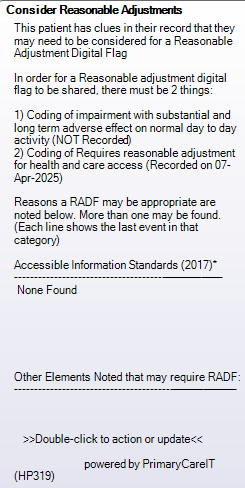
If the patient has a fully completed reasonable adjustment digital flag the following alert is shown:
You can double-click the alert for a easy-to-use data entry template:

Note that from 1st November 2024 a consent code is no longer required. Dissent is still applicable. See the NSHE guide to adding RADF to the spine here: https://digital.nhs.uk/services/reasonable-adjustment-flag/guide-to-using-the-reasonable-adjustment-flag-in-ncrs
Resolving the alert
Users can code "Review of Reasonable Adjustments needs" to resolve the alert for 12 months. There is also a couple of other codes that will remove the alert, so long as they are added after the code being flagged.
Code Term | SNOMED ID |
Review of Reasonable Adjustments needs | 1833271000000103 |
| Fully mobile | 160680006 |
No speech problem | 162293002 |
System Trigger
System Trigger(s):
- Load the medical record;
- Book an appointment.
Fitting your practice
To integrate this alert effectively:
- Ensure all staff are trained on the importance of RADF and how to manage alerts.
- Regularly review alert settings to align with current NHS standards and patient needs.
How to get it
This is a standard Handy Protocol, which means it is installed on your practice's EMIS as standard.
Support Information
Development Log
VERSION NUMBER 2.0.0
Version 2: Published 05/11/24 - removal of consent as a requirement and update to guidance.
Version 1: Published 27/08/24
Communications Log

New Alert: Reasonable Adjustments Digital Flag (RADF) Now Available!
We're excited to introduce the Reasonable Adjustments Digital Flag (RADF) alert, designed to enhance the care of patients with disabilities, as outlined in the Equality Act 2010. This tool ensures your healthcare team is always informed and prepared to meet the specific needs of these patients.
What does it do?
- Instant Notifications: Alerts clinicians and administrative staff when accessing a patient’s record about any existing RADF flag or potential need.
- Streamlined Recording: Facilitates the easy recording of consent or dissent regarding the RADF, ensuring compliance and personalized care.
How it Works:
- Access the patient’s record to see if an RADF is flagged.
- Double-click on the alert to record consent or dissent using our user-friendly template.
Learn More: For comprehensive details on RADF, visit NHS England’s guidance on reasonable adjustments.
Empower your practice with RADF and ensure every patient’s needs are met effectively and respectfully.