Using the Acute Condition Templates
Introduction
The suite of acute templates supports the structured clinical assessment and documentation of patients presenting with acute symptoms in primary care. They are organised around presenting complaints and body systems rather than individual diagnoses, reflecting how patients present and how clinical reasoning unfolds at the point of consultation.
Where the clinical presentation warrants it, templates are designed to guide clinician through a systematic assessment covering history and clinical observation, examination and management plan and diagnosis. Red flat symptoms are surfaced explicitly to support timely recognition and appropriate escalation. Where relevant, templates include direct links to patient information leaflets and cross-references to related clinical templates within SystmOne.
The suite does not attempt to create a template for every possible diagnosis. Instead, a symptom-based approach is taken: each template is built around a presenting complaint or body system, and is designed to support a thorough assessment before a working diagnosis is reached. This reduces the risk of premature diagnostic closure and support consistent, auditable documentation across clinicians and sites.
The suite currently covers the following presentations:
- Abdominal Pain
- Acne
- Asthma Exacerbation
- Back Pain
- Biopsychosocial Assessment
- Breast Symptoms
- Chest Pain
- COPD Exacerbation
- Cough
- Depression
- Diahorrea & Vomitng
- Ear Ache
- Febrile Child
- Foot Symptoms
- Genital - Female
- Genital -Male
- Indigestion
- Mouth Symptoms
- Red Eyes and Other Eye Symptoms
- Sinusitis
- Skin Infection
- Sore Throat
- Tired All the Time
- Urinary Tract Infection (UTI)
What do they actually do
Where the clinical presentation warrants it, templates guide the clinician through a systematic assessment covering history and clinical observation, examination, and plan and management. Red flag symptoms are surfaced explicitly to support timely recognition and appropriate escalation. Where relevant, templates include direct links to patient information leaflets and cross-references to related clinical templates within SystmOne.
Where QOF is relevant, the template has the usual useful right hand side link, also each template page has buttons which link out specialist page for that particular topic 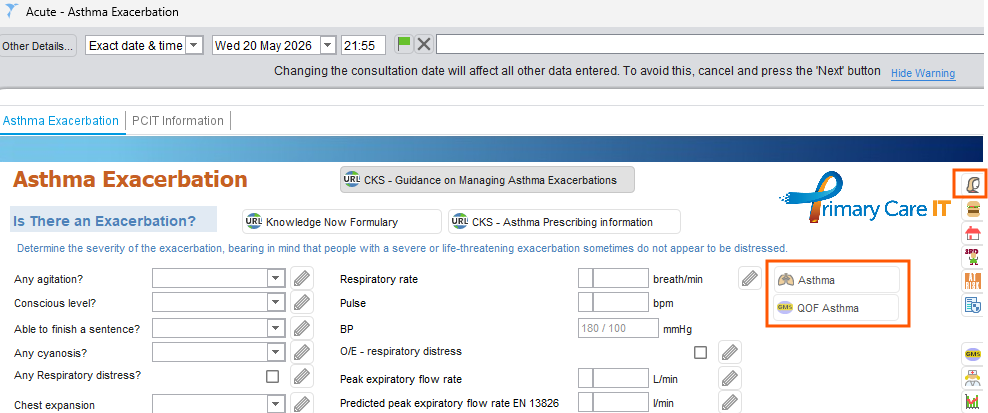
What Do They Look Like?
Below are some examples of PCIT acute condition templates
Where to find the templates?
We have created an Acute Condition Launcher, which groups all the available acute condition templates in one place. From the launcher, clinicians can navigate directly to any individual template with a single click. This Launcher is identified by a red star, and we recommend that GP practices add this to their SystmOne toolbar for ease of access. The launcher can also be retrieved via F12 by searching 'Acute Conditions'. For those who prefer to access templates directly, each individual acute condition template can equally be searched and launched via F12
From the PCIT Toolbar, click on the red star to launch
From the Cover Page click on the required page
System Dependencies
The template does not require additional SystmOne modules or permissions. It is important that users are aware that the template exists.
Fitting with your practice
Your team need to be aware of the location of this template. Team members who want to use this can add this to their F12 menus .